The “merge” command
This command merges changes from another project or ref within same project into a working copy.
The merges performed outside of SVN-Buddy are detected automatically (thanks to svn mergeinfo being used internally).
Arguments
path- Working copy path [default:.]
Options
--source-url=SOURCE-URL- Merge source url (absolute or relative) or ref name, e.g.branches/branch-name-r,--revisions=REVISIONS- List of revision(-s) and/or revision range(-s) to merge, e.g.53324,1224-4433orall--exclude-revisions=EXCLUDE-REVISIONS- List of revision(-s) and/or revision range(-s) not to merge, e.g.53324,1224-4433-b,--bugs=BUGS- List of bug(-s) to merge, e.g.JRA-1234,43644--exclude-bugs=EXCLUDE-BUGS- List of bug(-s) not to merge, e.g.JRA-1234,43644--merges- Show merge revisions only--no-merges- Hide merge revisions-f,--with-full-message- Shows non-truncated commit messages-d,--with-details- Shows detailed revision information, e.g. paths affected-s,--with-summary- Shows number of added/changed/removed paths in the revision--update-revision=UPDATE-REVISION- Update working copy to given revision before performing a merge--auto-commit=AUTO-COMMIT- Automatically perform commit on successful merge, e.g.yesorno--auto-deploy=AUTO-DEPLOY- Automatically perform remote deployment on successful merge commit, e.g.yesorno--record-only- Mark revisions as merged without actually merging them--reverse- Rollback previously merged revisions-a,--aggregate- Aggregate displayed revisions by bugs-p,--preview- Preview revisions to be merged
Configuration settings
merge.source-url- the default url to merge changes frommerge.recent-conflicts- (internal) list of recently conflicted paths from the last merge attemptmerge.auto-commit- whatever to automatically perform a commit on successful merge (used, when--auto-commitoption not specified)
Examples
The --source-url option can be used with any of below examples to merge from that url instead of guessing it. The source url can be specified using:
absolute url:
svn://domain.com/path/to/project/branches/branch-namerelative url:
^/path/to/project/branches/branch-nameref:
branches/branch-nameortags/tag-nameortrunk
svn-buddy.phar merge
The above command does following:
only, when
--source-urloption isn’t useddetects merge source url
when not detected ask to use
--source-urloption to specify it manuallywhen detected, then store it into
merge.source-urlconfiguration setting
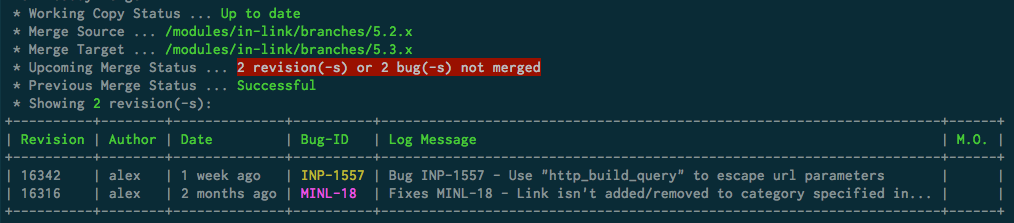
determines unmerged revisions between working copy and detected merge source url
displays the results (no merge is performed):
number of unmerged revisions/bugs
status of previous merge operation
list of unmerged revisions
svn-buddy.phar merge --revisions 5,3,77-79
Does all of above and attempts to merge specified revisions into a working copy. As the merge progresses the output of svn merge command is shown back to user in real-time (no buffering).
Revisions are merged one by one, because:
the results are displayed back to user much faster, then when merging several revisions in one go
conflict resolution is much easier, because exact revision that caused conflict is already known
The specified revisions to be merged are automatically sorted chronologically.
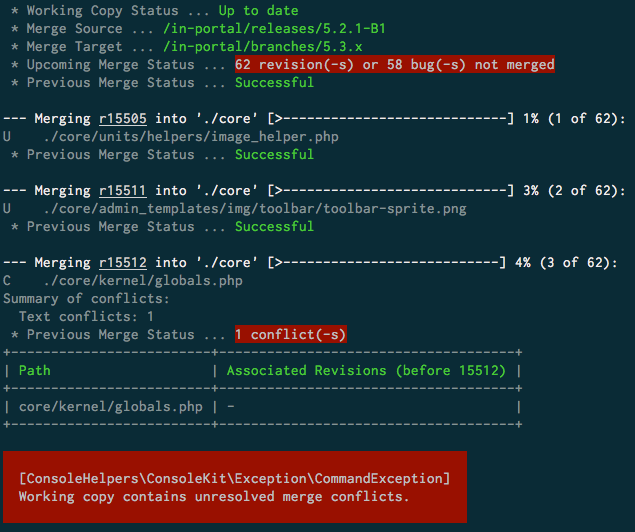
Only 2 outcomes from above command execution are possible:
the merge was successful - nothing extra, except
svn mergecommand output is displayedthe conflict happened during the merge or conflicting path existed prior the merge - the above shown error screen is displayed and conflicted paths are stored in
conflicts.recorded-conflictsconfiguration setting
The error screen shows:
the
svn mergecommand output (if was executed)the list of conflicted paths
for each path the list of non-merged revisions prior to merged one, that are affecting the conflicted path are displayed
The last bit can be quite helpful, when for example merging revision that changes a file, but not merging one before it, where this file was created.
After the merge conflict was solved the same merge command can be re-run without need to remove already merged revisions from --revisions option value.
Can’t be used together with --bugs option.
svn-buddy.phar merge --revisions all
Will merge all non-merged revisions.
svn-buddy.phar merge --bugs JRA-4343,3453
Will merge all revisions, that are associated with JRA-4343 and 3453 bugs. This would be a major time saver in cases, when:
only bug number is known
bug consists of multiple revisions created on different days
Can’t be used together with --revisions option.
svn-buddy.phar merge --auto-commit yes
Will automatically run svn-buddy.phar commit command on successful merge. Overrides value from merge.auto-commit config setting.
svn-buddy.phar merge --auto-commit no
Don’t automatically run svn-buddy.phar commit command, when merge was successful. Overrides value from merge.auto-commit config setting.
svn-buddy.phar merge --with-full-message
Thanks to log command being used behind the scenes to display non-merged revisions it’s possible to forward --with-full-message option to it to see non-truncated log message for each revision.
svn-buddy.phar merge --with-details
Thanks to log command being used behind the scenes to display non-merged revisions it’s possible to forward --with-details option to it to see paths affected by each non-merged revision.
svn-buddy.phar merge --with-summary
Thanks to log command being used behind the scenes to display non-merged revisions it’s possible to forward --with-summary option to it to see totals for paths affected by each non-merged revision.
svn-buddy.phar merge --update-revision 55
Will update working copy to the 55th revision before starting merge. Can be used to replay older merges for analytical purposes.
svn-buddy.phar merge --bugs JRA-123 --record-only
Will mark revisions, associated with JRA-123 bug as merged (no files will be changed).
svn-buddy.phar merge --revisions 55 --record-only
Will mark 55th revision as merged (no files will be changed).