The “log” command
This command shows the log messages for a set of revisions.
What makes this command really shine (compared to svn log command) is:
speed - the revision information from repository is cached locally and therefore it’s accessed blazingly fast
revision search - revisions can not only be found by path and number, but also using ref (e.g.
trunkortags/stable) and a bug numberrevision filtering - when found, revisions can be filtered further by their merge status (merged, not merged, is merge revision by itself)
detailed revision information - different information about revision is available and can be shown using set of built-in views: compact view, summary view, detailed view, merge conflict prediction view, merge status view
The revision is considered merged only, when associated merge revision can be found. Unfortunately Subversion doesn’t create merge revisions on direct path operations (e.g. replacing tags/stable with trunk) and therefore affected revisions won’t be considered as merged when using this command.
Bugs, associated with each revision, are determined by parsing bugtraq:logregex Subversion property at the root folder of last changed ref in a project. The assumption is made, that Subversion project won’t move to a different issue tracker and therefore value of bugtraq:logregex Subversion property is cached forever.
The working copy revision row is highlighted in bold in revision list to ease identifying of outdated working copies.
Arguments
path- Working copy path or URL [default:.]
Options
-r,--revisions=REVISIONS- List of revision(-s) and/or revision range(-s), e.g.53324,1224-4433-b,--bugs=BUGS- List of bug(-s), e.g.JRA-1234,43644--refs=REFS- List of refs, e.g.trunk,branches/branch-name,tags/tag-nameorallfor all refs--merges- Show merge revisions only--no-merges- Hide merge revisions--merged- Shows only revisions, that were merged at least once--not-merged- Shows only revisions, that were not merged--merged-by=MERGED-BY- Show revisions merged by list of revision(-s) and/or revision range(-s)--action=ACTION- Show revisions, whose paths were affected by specified action, e.g.A,M,R,D--kind=KIND- Show revisions, whose paths match specified kind, e.g.dirorfile--author=AUTHOR- Show revisions, made by a given author-f,--with-full-message- Shows non-truncated commit messages-d,--with-details- Shows detailed revision information, e.g. paths affected-s,--with-summary- Shows number of added/changed/removed paths in the revision--with-refs- Shows revision refs--with-merge-oracle- Shows number of paths in the revision, that can cause conflict upon merging--with-merge-status- Shows merge revisions affecting this revision--max-count=MAX-COUNT- Limit the number of revisions to output-a,--aggregate- Aggregate displayed revisions by bugs
Configuration settings
log.limit- maximal number of displayed revisions (defaults to10)log.message-limit- maximal width (in symbols) ofLog Messagecolumn (defaults to68)log.merge-conflict-regexps- list of regular expressions for path matching inside revisions ( used to predict merge conflicts, when--with-merge-oracleoption is used)
Examples
By default ref (e.g. trunk) to display revisions for is detected from current working copy. To avoid need to keep different working copies around add --refs X (e.g. --refs branches/branch-name) to display revisions from specified ref(-s) of a project.
All --with-... options can be combined together to create more complex views.
svn-buddy.phar log
Displays all revisions without filtering:
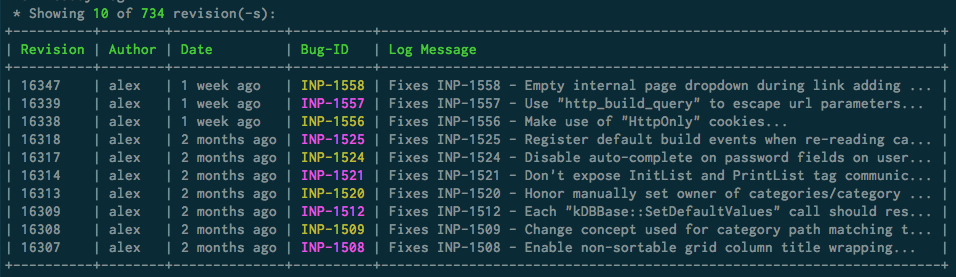
the number of displayed revisions is always limited to value of
log.limitconfiguration settingthe total number revisions is also displayed (when relevant) to indicate how much more revisions aren’t shown
svn-buddy.phar log --max-count 5
Displays all revisions without filtering, but limited by --max-count option value.
svn-buddy.phar log --revisions 10,7,34-36,3
Displays 3, 7, 10, 34, 35 and 36 revisions. Any combination of revision(-s)/revision range(-s) can be used.
svn-buddy.phar log --bugs JRA-10,6443
Displays revisions associated with JRA-10 and 6443 bugs.
svn-buddy.phar log --refs branches/5.2.x,releases/5.2.1
Displays revisions retrieved from branches/5.2.x and releases/5.2.1 refs. The valid refs formats are:
trunkbranches/branch-nametags/tag-namereleases/release-name
svn-buddy.phar log --refs all
Displays revisions retrieved from all refs in a project.
svn-buddy.phar log --action D
Displays revisions, where at least one path (directory or file) was deleted.
svn-buddy.phar log --kind dir
Displays revisions, where at least one affected path was a directory.
svn-buddy.phar log --action D --kind dir
Displays revisions, where at least one affected path was a directory at least one path (directory or file) was deleted, but this isn’t guaranteed to be the same path.
svn-buddy.phar log --merges
Displays only merge revisions.
svn-buddy.phar log --no-merges
Displays all, but merge revisions.
svn-buddy.phar log --merged
Displays only merged revisions.
svn-buddy.phar log --not-merged
Displays all, but merged revisions.
svn-buddy.phar log --merged-by 12,15-17
Displays revisions merged by
12,15,16and17revisions.
svn-buddy.phar log --with-full-message
The log message won’t be truncated in displayed revision list.
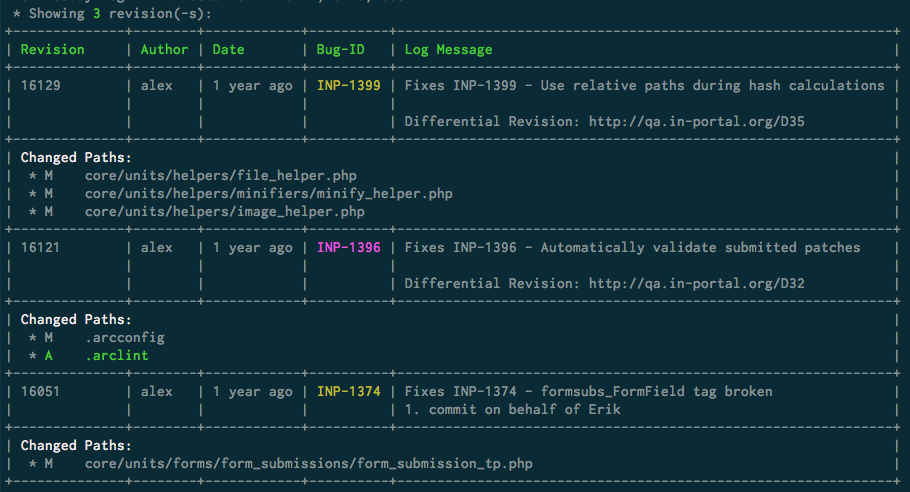
svn-buddy.phar log --with-details
Displays detailed information about revisions:
svn-buddy.phar log --with-summary
Compact alternative to --with-details option where only totals about made changes in revisions are shown in separate column:

svn-buddy.phar log --with-refs
Displays refs, affected by each revision:

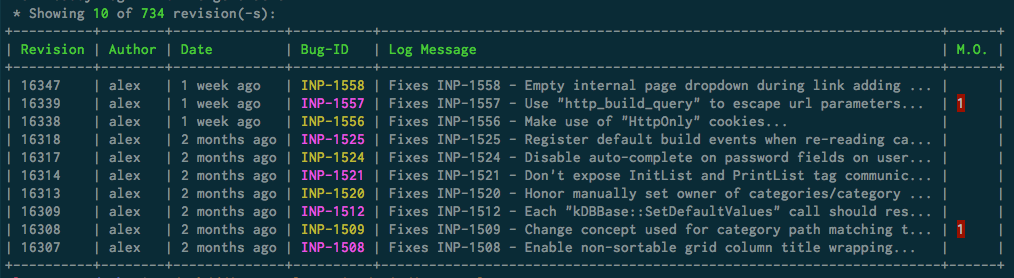
svn-buddy.phar log --with-merge-oracle
Shows how much paths in each revision can (but not necessarily will) cause conflicts when will be merged:
The log.merge-conflict-regexps configuration setting needs to be specified before Merge Oracle can be used. This can be done using following commands:
globally:
svn-buddy.phar config --edit log.merge-conflict-regexps --globalin a working copy:
svn-buddy.phar config --edit log.merge-conflict-regexps
Once Interactive Editor opens enter regular expression (one per line) used to match a path (e.g. #/composer\\.lock$# matches to a composer.lock file in any sub-folder).
In above image there are 2 revisions and each of them contain 1 path (detected using configuration setting defined above) that might result in a conflict.
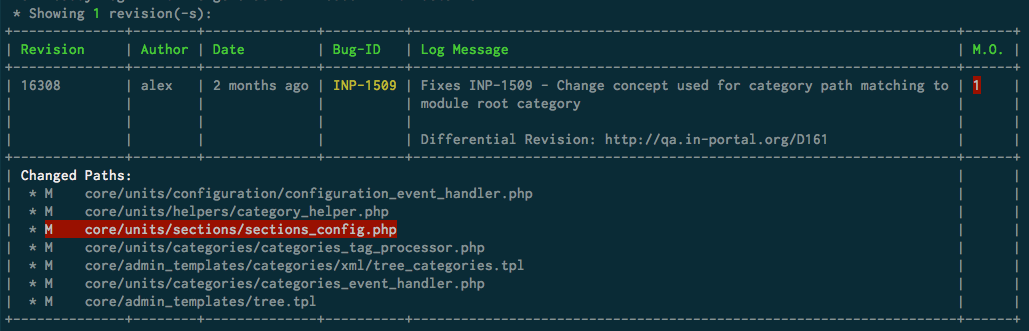
svn-buddy.phar log --with-merge-oracle --with-details
Displays changed paths in each revision, but also highlights potentially conflicting paths (from merge oracle) with red:
svn-buddy.phar log --with-merge-status
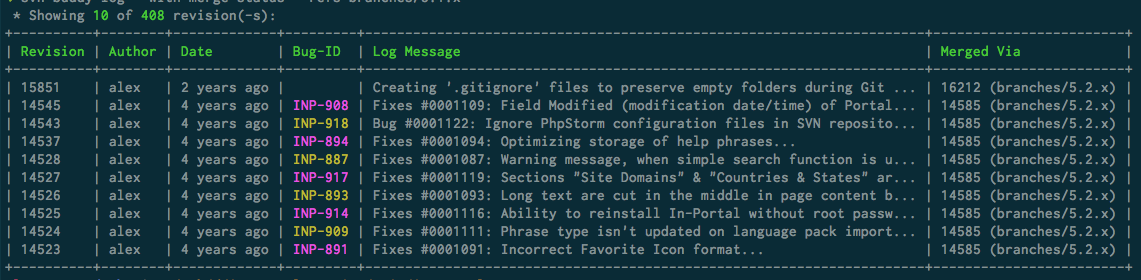
For each displayed revision also displays revision responsible for merging it (with merge revision ref):